A desktop app that saves every version of your work, undoes anything in one click, and merges other people’s changes without a fight. Real git underneath, no terminal.
when you open it
Chintu says hello!
Not a file tree and a wall of buttons. Your name, what you have been working on lately, and the handful of things you are actually about to do.
the translation
none of this replaces git. chintu runs the real thing underneath and just says it in a language you already speak.
and when it goes wrong
Both columns are quotes. The left is what git prints. The right is what chintu says instead, word for word out of the app.
the small one
Most days you never open the whole app.
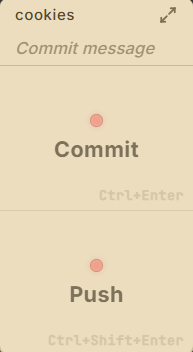
Chinti is a commit and push panel about the size of a business card, folded into a slim arrow on the edge of your screen. Point at it and it nudges out. Type what changed, press it, carry on. It has a second screen too: leave a project open on github.com and one click takes your own copy of it.
- Commit
- Ctrl + Enter
- Push
- Ctrl + Shift + Enter
A light on each button says whether there is anything to do, so you can read it from across the room without looking twice.